


Devantech USB-RLY06 – 6 x 16A USB relay
R472-USB-RLY06
This Devantech USB relay board provides 6 voltage-free contact relay outputs with a current rating of up to 16A each. Powered and controlled from any standard USB bus.
Acroname
The USB-RLY06 provides six volt free contact relay outputs with a current rating of up to 16Amp each. Between the normally open and common contacts we have also integrated snubbers for inductive loads. Power for driving of the relays is conveniently sourced from the USB supply. The relays are SPCO (Single Pole Change Over) types. The normally open, normally closed and common pins are all available on the screw terminals.
LED indication
Red LED’s are mounted immediately next to each relay to indicate whether it is in a powered state (LED on).
Relay power rating
| Load Type | Typical Applications | Rating |
|---|---|---|
| AC1 | Non inductive or slightly inductive loads | 16A @ 250V AC
3A @ 120V AC |
| AC15 | Control of electromagnetic load (>72VA) | 1.5A @240V AC |
| AC3 | Control of motor | 750W |
| DC1 | Non inductive or slightly inductive | 16A @ 24V DC |
| DC13 | Control of electromagnetic loads | 0.22A @ 120V DC
0.1A @ 250V DC |
Board Dimensions

- Low height: 15.7 mm
- 16A switching capability
- 5kV dielectric strength (between coil and contacts)
- Creepage distance: 10mm
- Meeting VDE 0700,0631 reinforce insulation
- Product in accordance to IEC 60335-1 available
- Sockets available
- Plastic sealed and flux proofed types available
- Environmental friendly product (RoHS complaint)
Applications
COM port
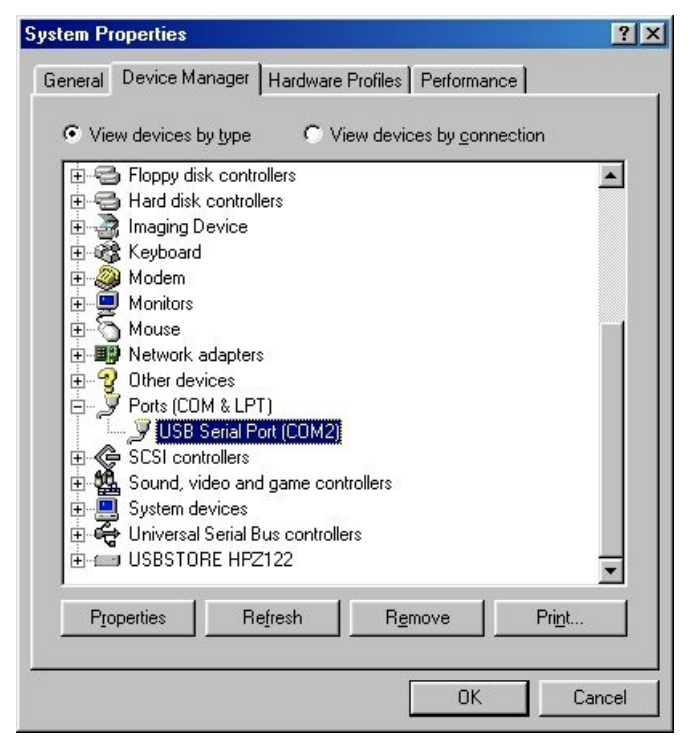
After plugging in the module to a spare USB port, you will want to know which COM port it has been assigned to. This will vary from system to system depending on how many COM ports you currently have installed. To find out where it is, right click on your “My Computer” desktop icon and select the “Device Manager” tab. Now scroll down and open the “Ports (COM & LPT)” tab. You should see the USB serial port listed – COM2 in the example below. If you want to change the COM port number – just right click on it, select properties, select advanced and select the COM port number from the available list. The COM port may be left at the default baud rate etc, because they are not actually used – there is a direct USB connection into the processor.
Commands
The USB-RLY06 operates with an easy to use command set as described in the table below. Most commands are only a single byte and if applicable the module will automatically send its response. The only exception to this being the “Set relay states” command which requires and additional desired states byte to be sent immediately after the command byte.
| Command | Action | |
| dec | hex | |
| 56 | 38 | Get serial number – returns 8 bytes of ASCII that form the unique serial number for module, I.E “00001543” |
| 90 | 5A | Get software version – returns 2 bytes, the first being the Module ID which is 46, followed by the software version |
| 91 | 5B | Get relay states – sends a single byte back to the controller, bit high meaning the corresponding relay is powerd |
| 92 | 5C | Set relay states – the next single byte will set all relays states, All on = 6 lowest bits set in byte (xx111111) All off = 0 |
| 100 | 64 | All relays ton |
| 101 | 65 | Turn relay 1 on |
| 102 | 66 | Turn relay 2 on |
| 103 | 67 | Turn relay 3 on |
| 104 | 68 | Turn relay 4 on |
| 105 | 69 | Turn relay 5 on |
| 106 | 6A | Turn relay 6 on |
| 110 | 6E | All relays off |
| 111 | 6F | Turn relay 1 off |
| 112 | 70 | Turn relay 2 off |
| 113 | 71 | Turn relay 3 off |
| 114 | 72 | Turn relay 4 off |
| 115 | 73 | Turn relay 5 off |
| 116 | 74 | Turn relay 6 off |
| Characteristics | ||
| Insulation Resistance | 1000MΩ (at 500VDC) | |
| Dielectric Strength | Between coil and contacts | 5000VAC 1min |
| Dielectric Strength | Between open contacts | 1000VAC 1min |
| Dielectric Strength | Between contact sets | 2500VAC 1min |
| Surge voltage (between coil & contacts) | 10kV (1.2 x 50μs) | |
| Operate time (at nomi. volt.) | 15ms max. | |
| Release time (at nomi. volt.) | 8ms max. | |
| Temperature rise (at nomi. volt.) | 55K max. | |
| Shock Resistance | Functional | 98m/s² |
| Shock Resistance | destructive | 980m/s² |
| Vibration Resistance | 10Hz to 150Hz 10g/5g | |
| Humidity | 35% to 85% RH | |
| Termination | PCB | |
| Ambient Temperature | -40° C to 85°C | |
| Unit weight | Approx. 13.5g | |
| Construction | Plastic sealed, Flux proofed | |